SnowCompare

SnowCompare

SnowCompare is the easiest and fastest way to compare & deploy Snowflake data from one database or schema to another.
While Snowflake allows you to code and write SQL to compare data it's still regularly cumbersome for a regular user or analyst.
Zero Copy Cloning is so easy in Snowflake but what happens when you cloned a database several times and you want to understand the differences between the clone and the original database?
This is where SnowCompare comes in and makes this super easy to visually see the differences.
Get on the waiting list for this free tool!  We plan to release in October.

Find out more about all the benefits SnowCompare has to offer you and your business. Sign up for a free proof of concept!

SnowSheets

SnowSheets

SnowSheets allows you to connect Google Sheets to a Snowflake database.

You can:
  • View (select) Snowflake data within Google Sheets.
  • Create tables, update, insert, and delete rows from tables and keep Google Sheets synchronized with Snowflake.
  • Allows for easier editing of data within Snowflake.

Get on the waiting list for this free tool! We plan to release in September.

Find out more about all the benefits SnowSheets has to offer you and your business. Sign up for a free proof of concept!

Integrating Databricks with Snowflake

Overview:


Here is a practical guide to integrating Databricks with Snowflake. We will get you started with the basic setup and show you how easy it is to get the two of them connected to write and read data from each other.


Pre-Requisites:


1. You must have a Snowflake Account (the good thing is that this is easy!)– You get a 30-day free trial, including $400 of free credits. Open a Free Snowflake Account Setup here

2. You need to set up at least a Databricks Community edition (The Community Edition is free) – The Databricks Snowflake connector is included in Databricks Runtime 4.2 and above.


Try Databricks Free

You should have some basic familiarity with Dataframes, Databricks, and Snowflake.


At a high level, we are doing these main steps:

Step 1: Import a notebook that already has a shell of the code you need.

Step 2: Fill in the details in the notebook for your Snowflake database.

Step 3: Execute the 3 separate parts of the notebook which will be:

Step 4: Make the connection.

Step 5: Write a data frame to snowflake.

Step 6: Read a snowflake table back into a data frame.


Steps:


Okay. Now that you have a Databricks Account setup then log in. I’m going to assume you have the Community Edition so the login is here: (if you have the regular editions then login to the appropriate area).

https://community.cloud.databricks.com/login.html

Then once you are logged in you should see a screen like this:
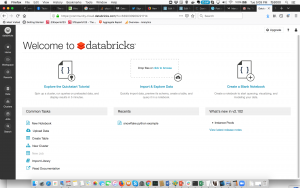


Go to the Workspace icon (It is the 3rd from the top on the left-hand side) Once you click on it then on the right there will be a dropdown arrow to the right of the menu item “Workspace”.  When you click there then click on Import and it should look like this:
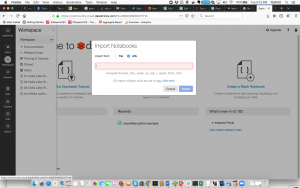
 

Databricks Import URL


Then Choose the URL there and put in this notebook link and click the Import Button. https://docs.databricks.com/_static/notebooks/snowflake-python.html

  • This is one of my favorite parts about Databricks, they make it look easy to share Notebooks and be more organized.

Once you have imported the notebook it should look like this:
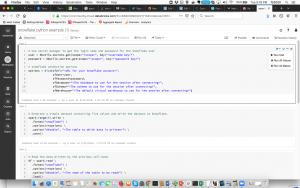
 

Databricks Notebook to Snowflake


There are 3 main sections to this sample connector notebook from Databricks:


1.  The Snowflake connection:


You need to fill in all the details in blue. You should set up the data bricks secrets to start.

Then make sure you add the other appropriate details here (database, schema, warehouse):

  • You will notice on the image there is in the upper right a run button. If you have worked with Jupyter Notebooks this is very similar.


2.  Write Data to a Snowflake table:


Fill in the sections in blue. Mainly just what table you want to write to. If the table is not created then it will create it for you.  If you wish to carry out further tests with your data and create a data frame, you can modify this section accordingly: spark.range(5).write.


3.  Read Data to a Snowflake table:


Fill in the sections in blue. Mainly just what table you want to read from which is the one you just created.

This is a straightforward example that demonstrates how to connect Databricks and Snowflake. The process of connecting Spark outside of Databricks is also relatively easy but requires setting up the Spark to Snowflake Connector and the JDBC Driver. Fortunately, Databricks 4.2 and higher come with these already set up, which makes the process even smoother.

Find out more about all the benefits Snowflake has to offer you and your business.


Conclusion:


In conclusion, integrating Databricks with Snowflake is a simple process that can be done in just a few steps. By following the guide above, you can easily connect the two platforms and write and read data from each other. This integration opens up many possibilities for data analysis and business intelligence, making it a valuable tool for any organization.

How To Setup Confluent with Snowflake

What is Confluent in Snowflake?

Confluent is a data streaming platform based on Apache Kafka. It allows for the integration of different data sources and the processing of large amounts of data in real-time. In this document, the instructions are provided for setting up Confluent with Snowflake, a cloud-based data warehousing and analytics platform. The purpose of this integration is to move data generated in Confluent/Kafka into Snowflake for further analysis and insights.


How To Set Up Confluent with Snowflake:

Here is a practical guide to getting started with setting up Confluent with Snowflake

Pre-Requisites:

  1. To start, you'll need a Snowflake Account. Don't have one yet? Not to worry - you can sign up for a 30-day free trial with $400 credit at Free Snowflake Account Setup.
  2. This setup requires using Docker. (I’ll have separate instructions to do this without Docker later)
  3. You also need git.

Here we go – there are 3 main parts to this setup:

  1. Get this docker version of confluent/Kafka up and running.
  2. Create a topic on it to generate data for moving data into Snowflake.
  3. Setup the Kafka to Snowflake Connector as the Destination with the right Snowflake connectivity.

Part 1 – Get the docker version of Confluent/Kafka running

Okay…The first time it will take a few minutes to download… and you will see the output eventually like this:

If you want to verify that everything is up and running then execute this command:

Part 2 – Create a topic to send Data to Snowflake. Generate data for it with the DataGen functionality.

Let’s go… execute these commands in sequence:

Create a topic:

Generate data for the topic: Let’s first configure a JSON file for the data we want to create. Use whatever editor you want and create this file u.config.

I’m using vi u.config and pasting this in there:

u.config details

Part 3 – Download the Kafka to Snowflake Connector and configure it.

So you have Confluent/Kafka up and running. You have data generated into a topic.

So now just download the magical Kafka to Snowflake connector here: https://mvnrepository.com/artifact/com.snowflake/snowflake-kafka-connector/0.3.2 I’m sure by the time I publish this the version will change but for now, assume it’s this one.

Once you have the file in the same directory we have been using for everything then copy it to the connected virtual machine where it needs to be to work.

You now need to create the configuration file to set up the Connector and the Sink associated with it that connects to the Snowflake Database.  This does assume you have already set up your RSA key.  You do have to fill in 6 of the settings below to have this setup for your specific configuration. Again, use your favorite editor.  I’m using:vi connector_snowflake.config and entering in my specific details.

connector_snowflake.config details

Almost there. Now use this configuration file to set up the sink.

Now in a few seconds or minutes if you set up everything correctly the topic should be written on the Snowflake table. Go into the database and schema you connected to and you should be able to execute something like:

Now you should see data flowing from Kafka to Snowflake. Enjoy!

Find out more about all the benefits Snoptimizer has to offer you and your business. Sign up for a free proof of concept!

A New Era of Cloud Analytics

A NEW ERA OF CLOUD ANALYTICS WITH SNOWFLAKE AS THE HADOOP ERA ENDS

Hadoop was regarded as a revolutionary technology that would change data management and completely replace data warehousing. Such a statement is partly accurate but not entirely true since it has not been the case ever since cloud solutions came into the picture. Hadoop mostly flourishes with projects that involve substantial data infrastructure, meaning it was more relevant around a decade ago when most data analysts (more…)

Not On The High Street: Improving customer experience with Snowflake

Not On The High Street: Improving customer experience with Snowflake

Companies like notonthehighstreet.com are taking their customers' experience to the next level, with an online marketplace delivering unique products and services in a singularly convenient way. Without speedy data delivery though, as attested to by their Director of Data in this video, this marketplace just wouldn't keep their customers coming back for more. Their countless partners benefit from this as well, but (more…)

Snowflake’s Differentiating Features

What are the features of Snowflake that differentiate it from all its competitors?  I started this list in 2018 and it continues to evolve. Sure, I am a Snowflake Data Superhero and longtime Snowflake Advocate. I do try to be objective though.  Also, I have had a long long career of partnering with new technologies during my 19 years of running a successful consulting firm.  I have to state that most vendors and technologies do NOT impress me at all.  While I partnered with Microsoft (we were a gold partner for many years) and many others, the reality is that most of their technology was not a game-changer like an internet or Netscape (the first browser). They typically were solid technology solutions that helped our clients.  When I discovered Snowflake at the beginning of 2018 when looking to build a custom CDP for a Fortune 50 company I realized this technology and this architecture was going to be a game changer for the data processing industry, especially within BIG DATA and ANALYTICS.  

Snowflake's Differentiating Features (2018 or before)

  1. Concurrency and Workload Separation [enabled by the Separation of Compute from Storage.]  [huge! for the first time, you could completely separate workloads and not have the traditional concurrency challenges of table locking or ETL jobs COMPETING with Reporting or Data Science jobs.]
  2. Pay-as-you-go pricing (also, named Consumption-based pricing) - This enabled for the very first time that startups and medium-sized businesses could get true cloud BIG DATA scale at an amazingly affordable price.  This never happened before this.
  3. Time-Travel.  (Based on write-ahead Micro-partitions.)
  4. Zero-Copy Cloning.
  5. True Cloud Scale.  DYNAMIC (the way it should be!) In and Out Scaling with Clusters.
  6. True Cloud Scale.  Up and Down.  [code or manual still at this point.  Switching between XS to 4XL warehouse t-shirt sizes]
  7. Data Sharing (this may be my favorite feature.  Data Sharing is transforming industries)
  8. Snowpipe.  The ability to handle the ingestion of streaming data in near real-time.
  9. Data Security.  Encrypted Data from end-to-end.  While some other vendors had some of this Snowflake made security first in the cloud.
  10. Semi-Structured Data ease of use.  Snowflake has been the easiest way we have been able to have JSON and other
  11. Lower Database Administration.   Amazingly, no database vendor didn't automate the collection of database/query statistics and automated indexing/pruning before.  Huge STEP forward.   [I DO NOT agree with Near-Zero Administration - this is not true especially as Snowflake transformed to a data cloud and added on tons and tons of additional features which have some additional administration requirements]

Snowflake's Differentiating Features (2019-2021)

  1. Data Exchange and then Data Marketplace.
  2. Cloud Provider Agnostic. Move to support Azure as well as GCP in addition to AWS.
  3. Data Clean Room V1. Capability to use Secure User Defined Functions within Data Shares.
  4. Data Governance Capabilities.
  5. Integrated Data Science with Snowpark. [still needs work!]
  6. Unstructured data. Amazingly now

Snowflake's Differentiating Features (2022)

*I'm going to wait until December 2022 to finalize this list.  There were some amazing announcements.

One item though that I"m finding awesome is  Access to the SNOWFLAKE.ORGANIZATION_USAGE Schema (I think it's still in preview but this makes Organizational reporting so much easier.  Previously we build tools that would log into each account and go to the SNOWFLAKE.ACCOUNT_USAGE schema views within each count and pulls it back to a centralized location.  Sure it worked but it was a pain.

To be fair and not a complete Snowflake Advocate, Snowflake needs a reality check right now.  Snowflake Summit 2022 was an amazing amount of announcements.  (Even though a focused business person could argue... what is Snowflake now?  A Data Cloud?  A data application development environment?  A Data Science and ML tool?  My heart goes out to the Account Executives.  They have to focus first when they do capacity deals on the true value of what Snowflake provides today!)   Also, the true reality is many of the significant announcements remind me of my Microsoft Gold Partner days.... lots of Coming Soon.... but not that soon.  Many of these feature announcements will not be truly available until 2023.

Snowflake's Differentiating Features (2023)

Coming next year :). you just have to wait!

Summary

Since 2018, I was getting questions from so many colleagues and customers about why is Snowflake better than the on-prem databases they were using.  Or I was getting tons of questions about why Snowflake is different than Redshift or Big Query or Synapse.  

So this article is my attempt to explain to both business users of data and data professionals (from architects to analysts) why Snowflake is different from any other technology.

GigOm

GigOm

With superior performance and the most hands-off model of ownership, Snowflake is the epitome of a data warehouse as a service. The model, cost, features, and scalability have already caused some to postpone Hadoop adoption. In its multicluster, scale-out approach, Snowflake separates compute from storage. It is fundamental to the architecture where multiple, independent compute clusters can access a shared pool of data without resource contention. Customers pay for what is used without a stairstep approach to resources and pricing.

  • The cost model is simple at terabytes per year or computing hours.
  • For primary storage, Snowflake uses Amazon’s Simple Storage Service (S3). Snowflake also uses an SSD layer for caching and temp space.
  • Snowflake customers deploy a wide array of modern BI and visualization tools, some utilizing the ODBC and JDBC connectivity.
  • Snowflake also offers a web interface.
  • Snowflake SQL includes support of objects in JSON, XML, Avro, and Parquet using a special data type that can handle flexible-schema, nested, hierarchical data in table form.
  • There are no indexes either, as zone maps are used for an abstract understanding of data in the database. SQL extensions include UNDROP and CLONE. Features include result set persistence and automatic encryption.
  • No downtime is required for anything including upgrades or cluster expansion.
  • Concurrency, a clear challenge in database scale-out, is a focus at Snowflake.  Their automatic concurrency scaling is a single logical virtual warehouse composed of multiple compute clusters split across availability zones.
  • Finally, Snowflake has a native connector for Spark built on the Spark Data Sources API.

Snowflake has jumped constraints found in databases from earlier development and honed a very promising cloud analytic database. Eminently elastic on a foundation of separation of computing and storage, Snowflake offers as close to a hands-off approach as we found. Snowflake is market-leading in what you would want for a multi-purpose cloud data warehouse analytical database.

Source - GigaOm Sector Roadmap: Cloud Analytic Databases 2017

Snowflake vs Netezza

Snowflake vs Netezza

Fifteen years ago, IBM introduced an appliance-based, on-prem analytics solution known as Netezza. It was purpose built, load ready, and met a lot of the needs of the day (back when on-prem was still largely the preferred choice for data warehousing solutions). One could say IBM really hit the ball out of the park, and Netezza has definitely enjoyed a good, solid run since then, but that was fifteen years ago, and times have (more…)

Looker

Intro - What is Looker?

Looker is a business intelligence software and big data analytics platform that is designed to analyze both structured and semi-structured data. It is ideal to use with Snowflake, as it allows users to analyze data from disparate sources, transform data into knowledge right at query time, and leverage all the power and flexibility of Snowflake directly from Looker. Additionally, it enables users to make sense of all their data with one tool and to chart, graph, format, and explore data in one place. It also allows users to share data via URL, access data wherever they need it, schedule delivery, and export data locally or directly to Google Drive, Dropbox, or S3. Looker is fully embeddable with SSO and has a responsive mobile design.

Looker is the ideal tool to use with Snowflake:

  • Analyze both structured and semi-structured data with ease.
  • Leave your data in Snowflake, granularly control access from Looker.
  • Define business logic to transform data into knowledge right at query time.
  • Any data that is shared through the Sharehouse is immediately available in Looker. Known datasets can use Looker Blocks™ and extensions to share a data model as well as data.
  • Snowflake’s advanced SQL dialect is rich in features. Leverage all the power and flexibility of Snowflake directly from Looker.

Analyze data from disparate sources:

  • Adapt Looker to fit your data.
  • Direct connection to any SQL database.
  • Virtual, code-based schema applied at query time for flexibility.
  • Make sense of all your data with one tool.

Governance:

  • Centrally-defined, version-controlled business logic lives for everyone to use.
  • Collaboration and versioning with Git.
  • Every analyst gets a sandbox.
  • Every version of your definitions is easily accessible and implementable.

Give everyone immediate access to information:

  • Everyone can self-serve from curated data.
  • Connect directly to the database to explore all your data.
  • Centrally defined and shared metrics.

Chart, graph, format, and explore data in one place:

  • Web-native, interactive visualizations.
  • In-browser visualizations.
  • Drag & drop to create or edit their dashboards.
  • Custom visualizations.

Leverage the Value of Your Data:

  • Sharing via URL.
  • Access your data wherever you need it (Slack, Salesforce, etc.).
  • 100% browser-based.
  • Everyone can schedule delivery.
  • Export locally or export directly to Google Drive, Dropbox, or S3.
  • Fully embeddable with SSO.
  • Responsive mobile design.

Conclusion:

In conclusion, Looker is a powerful business intelligence software that is designed to analyze both structured and semi-structured data. It is particularly useful when used with Snowflake, as it enables users to leverage all the power and flexibility of Snowflake directly from Looker. With its ability to analyze data from disparate sources, transform data into knowledge right at query time, and explore and share data in one place, Looker is an ideal tool for businesses looking to make the most of their data.

If you want more news and information on Snowflake updates, be sure to check out our blog.

ETL vs ELT: Data Warehouses Evolved

ETL vs ELT: Data Warehouses Evolved

For years now, the process of migrating data into a data warehouse, whether it be an ongoing, repeated analytics pipeline, a one-time move into a new platform, or both, has consisted of a series of three steps, namely: (more…)

Snowflake vs Hadoop

Snowflake vs Hadoop

Lots of people are aware of Hadoop for its advantages, like ease of data loading and scaling, but more and more are becoming increasingly aware of its limitations, like (more…)

Snowflake vs Redshift

Intro - Snowflake vs. Redshift


When it comes to cloud data warehousing solutions, Snowflake and Redshift are two of the most popular options. Both solutions offer fast and efficient data processing, but there are some key differences to consider that can help determine which one is the better fit for your organization.

In this article, we'll cover each one in-depth so you can decide what is the best option for you and your organization.


Snowflake:


Snowflake is known for its ease of use and scalability, making it an attractive option for organizations that need a solution that is simple to set up and manage. Its cloud-native architecture allows it to automatically scale up or down as needed, which helps ensure that performance remains consistent, regardless of data size. Additionally, Snowflake's user-friendly interface and support for ANSI SQL make it easy for teams to get started with the platform quickly.


Snowflake Benefits:


There are several benefits to using Snowflake Data Cloud, but the three most important ones are:

1. Ease of use and scalability

2. Cloud-native architecture that automatically scales up or down as needed

3. User-friendly interface and support for ANSI SQL

These features make Snowflake an attractive option for organizations that need a solution that is simple to set up and manage, with consistent performance, regardless of data size. Additionally, Snowflake's user-friendly interface and support for ANSI SQL make it easy for teams to get started with the platform quickly.


Redshift:


On the other hand, Redshift is a popular choice for organizations that are already using Amazon Web Services (AWS). Redshift integrates seamlessly with other AWS services, which can make it easier to manage your entire AWS infrastructure from a single console. Additionally, Redshift's pricing model can be more cost-effective than Snowflake's, depending on the size of your data warehousing needs.


Redshift Benefits:


There are several benefits to using Snowflake Data Cloud, but the three most important ones are:

1. Seamless integration with other AWS services.

2. Potentially more cost-effective pricing, depending on data warehousing needs.

3. High performance for complex queries and large datasets.


Conclusion:


It's important to carefully evaluate the needs and priorities of your organization when choosing between Snowflake and Redshift. Consider factors such as ease of use, scalability, compatibility with other services, pricing, and any specific requirements your organization may have. By testing both solutions and comparing their features, you can choose the data warehousing solution that best meets your needs.

Ultimately, the choice between Snowflake and Redshift will depend on the specific needs of your organization, but with careful consideration and evaluation of each solution, you can make an informed decision that will benefit your organization in the long run.

Snowflake vs Teradata

Snowflake vs Teradata

To anyone with even a passing level of familiarity of this space, Teradata is quite rightly known as a powerhouse in the data warehousing and analytics arena. it's been the go-to technology for sectors ranging from various 3 letter intelligence agencies, to the most recognizable of medicine, science, auto, and telecom industry players combined.

We have been building data systems for years, including those incorporating Teradata (such as for a Data Warehousing project we executed for TicketMaster back in 2007), so this really is the most excited we've been in all that time, given all the new capabilities available now, as compared to then. Today we wanted to share with you some findings based on several industry-leading reports concerning cloud data warehousing and analytics in 2017/18, especially as it concerns Snowflake when compared to such an industry giant such as Teradata. (more…)

Strava: Data Sharing with Snowflake

Strava: Data Sharing with Snowflake

Data companies like Strava are really vertical pioneers, as they've created a veritable social network for athletes to upload, track, and compete with other athletes worldwide. As attested to by their data engineer in this video, without data, Strava wouldn't exist, and the more people find they have access to it, the more they hunger for it. Yet as they grew, this imposed significant delays in the time it took for users to query their data, so beyond the data sharing features Snowflake uniquely provides, there were multiple benefits Strava encountered by using Snowflake. (more…)

SpringServe: Data Sharing with Snowflake

SpringServe: Data Sharing with Snowflake

If ever there was an industry to discover huge benefits from Snowflake's Data Sharing technology, it's Advertising!

SpringServe delivers ads, in video format, with a reputation for providing immediate reporting on ad performance. They serve hundreds of thousands of ad requests per second, and as their collaborations and partnerships grew, so did the number of (more…)

Localytics: Data Sharing with Snowflake

Localytics: Data Sharing with Snowflake

Localytics provides market engagement analysis services to makers of apps far and wide. Being a data company, and given the prevalence of mobile apps today, plus with how many clients were making use of their SDK, the scale of their data requirements climbed into the Petabytes. The costs for this level of data, using their legacy data warehousing system, shot into territory that just no longer made sense for them as a business (to say nothing for an ever growing latency issue as well). (more…)

Playfab: Data Sharing with Snowflake

Playfab: Data Sharing with Snowflake

Here's a great example of how Playfab, an online back-end service for game developers, leverages Snowflake's Data Sharing functionality. Video games are increasingly delivered as part of an online service, and so game developers, now more than ever, are in need of one, secure space from which to host all their assets, tools, and data (both outbound, and from their players)! (more…)

Semi-Structured Data Loading & Querying in Snowflake

Semi-Structured Data Loading & Querying in Snowflake

Unstructured data has become a tremendously popular format today (be it JSON, Avro, Parquet, or XML) for a multitude of things such as IoT, mobile, and apps. Until now though, there's been no fast and easy way to store and analyze this kind of data, but (more…)

Query Caching in Snowflake

Query Caching in Snowflake

Have you ever experienced slow query response times while waiting for a report that's being viewed by multiple users and/or teams within your organization simultaneously?

This is a common issue in today's data driven world; it's called concurrency and it's frustrating, usually delaying productivity just when the data being requested is needed the most. Well, here's an incredible time saver you may not have yet heard about: (more…)